Important Note - Time Sensitive
The information below requires action Before October 1st 2026
Introduction
Starting in October 2026, Microsoft are in the process of retiring Exchange Web Services (EWS) as a method to authenticate to Exchange 365 in favour of the newer Microsoft Graph API. To accommodate this change, all users of Spindle Document Distribution that use Exchange 365 (aka Exchange Online) will need to update either the email device components using a patch installer or else upgrade to the current release which contains the updates.
Microsoft have published this article to explain:
Exchange Online EWS, Your Time is Almost Up | Microsoft Community Hub
Applies To
- Spindle Document Distribution Standalone
- Spindle Document Distribution Cloud
- Spindle Document Management
Who is affected?
This change will affect all users of Spindle Document Distribution (whether Standalone, Cloud, or as a part of Spindle Document Management), who use the Exchange 365 email connector.
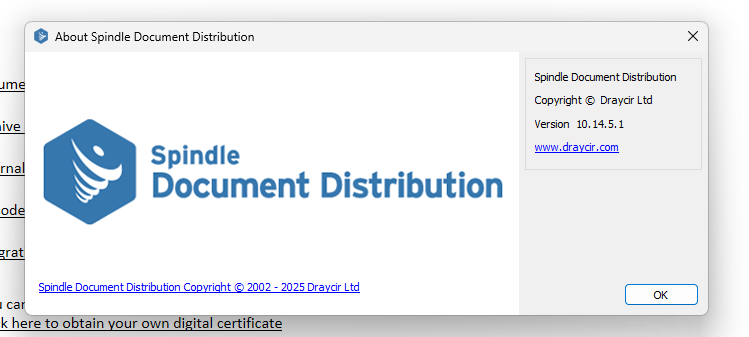
To establish the required next steps, first identify the version of Spindle Document Distribution in place. You can find this
- In Spindle Document Distribution Tools under Help>About:
- In Windows Control Panel>Programs and Features (appwiz.cpl):

- At the top of any log file located in the user's Documents\My Draycir Logs\Spindle Document Distribution.

Version 7.0 - 8.14
These versions are unaffected as they do not contain the components to connect to Exchange 365, however these are considered legacy versions and are no longer supported by Draycir, so we would advise upgrading to the current release to maintain support.
Version 8.15 - 10.15
These versions will need to be updated if the Exchange email connector is in use, either by applying the EWS Patch or preferably by upgrading to the current release.
To check the email connector, open up Spindle Document Distribution Tools>User Settings>Email Settings>See selected dropdown: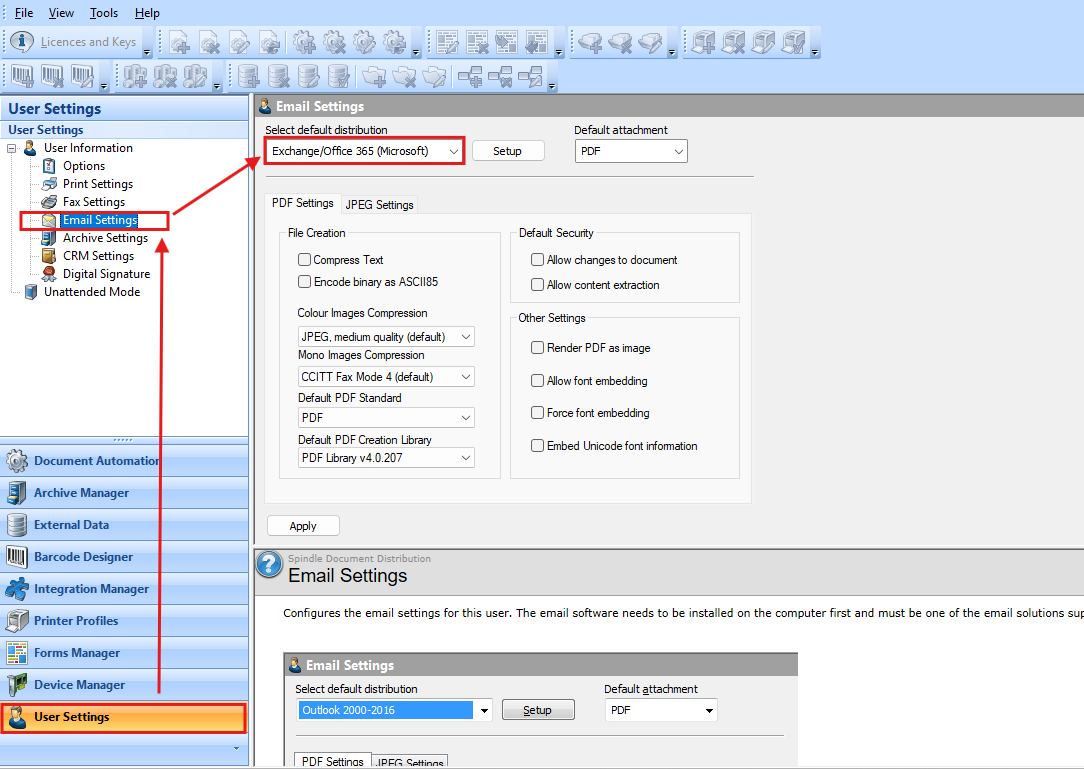
If the selected default distribution is not "Exchange/Office 365 (Microsoft)", then you will not be affected by the EWS deprecation.
If the selected default distribution is "Exchange/Office 365 (Microsoft)", then you will need to click "Setup" and confirm if it is "Exchange Online" or "Exchange On-Premise":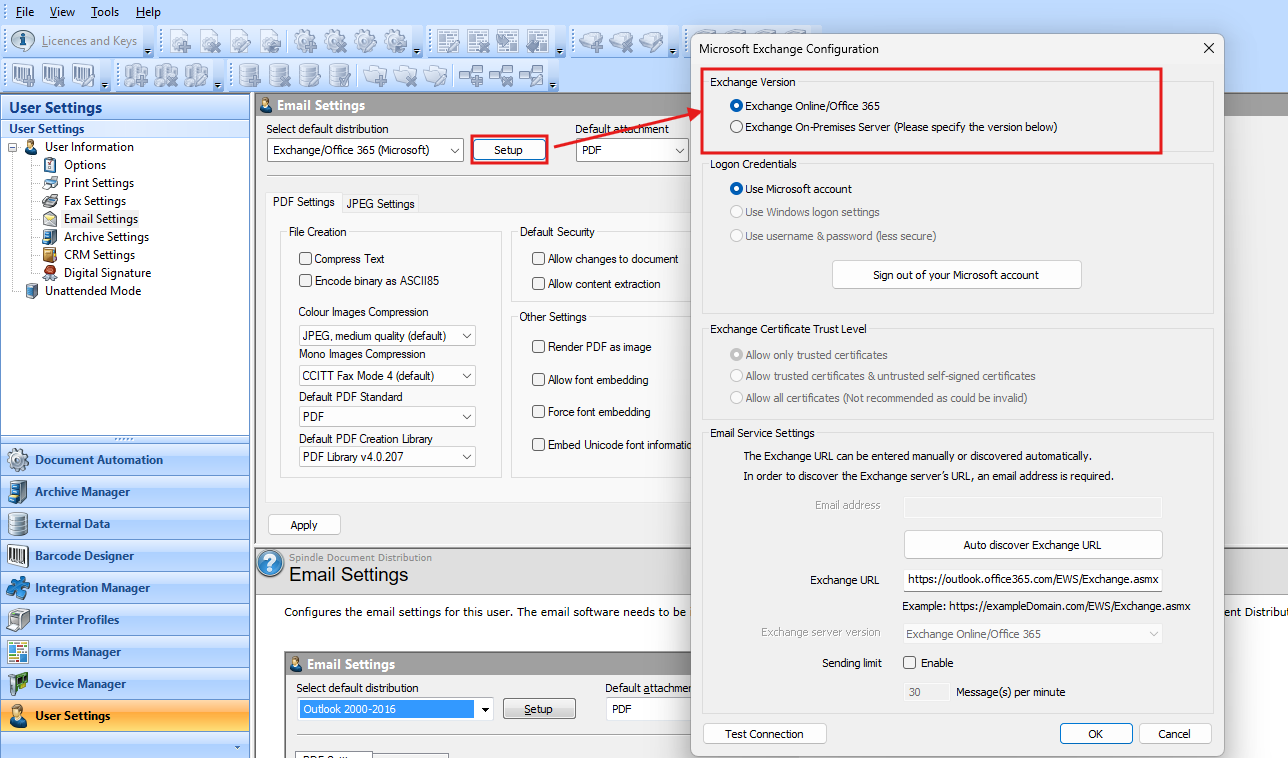
If "Exchange Online" is selected then you will be affected by this deprecation.
If "Exchange On-Premise" is selected then you will not be affected by this deprecation.
Version 10.16 - 11.0 and later
These versions contain the updated components, so no action is required.
I am affected, what are my options?
In the immediate term, you can either update the components or defer the change to the MS Graph API to allow time to plan an upgrade at a later date. We would recommend upgrading but appreciate that you may need to continue with EWS for a short time further.
Option 1 - Use the MS Graph API
Please see these article for details of the upgrade process
Option 2 Defer the switch to MS Graph
While Draycir recommend that you upgrade or apply the patch to all users, we understand that it may cause interruptions to users that needs to be managed.
For these cases, Microsoft have provided a method to delay the switch off of EWS Authentication for specified applications, using the EWSAllowedAppIDs setting in your Microsoft tenant.
See this article for details. Parts of this article require action before the October 1st 2026
Please be aware that the above is a temporary fix, and you will need to upgrade to a version of Spindle Document Distribution that fully supports MS Graph, so we would advise planning the upgrade. MIcrosoft's published timeline for the full removal of EWS support is laid out in this article:
Deprecation of Exchange Web Services in Exchange Online | Microsoft Learn
Knowledge Base Article Details
| Related Product | Spindle Document Distribution |
| Reference Number | KBA 01-01-024 |
| Document Date | 26/08/2026 |
| Original Author | Vince Hodgson |
| Document Version | 1.0 |
| Last Updated | 02/09/2026 |
| Update Author | Navneet Dhami |
| Keywords |
Was this article helpful?
That’s Great!
Thank you for your feedback
Sorry! We couldn't be helpful
Thank you for your feedback
Feedback sent
We appreciate your effort and will try to fix the article