The Clock is Ticking…
As we enter September 2026, we are rapidly approaching the important milestone of:
1st October 2026
Which is when Microsoft begin the next phase of Exchange Web Services (EWS) retirement.
If you are affected and do not act on the 1st of October you will lose the ability to connect to Exchange with unpatched versions of Spindle Document Distribution v10.15 and earlier.
Draycir have developed and released an upgrade to make use of EWS’s successor, MS Graph. This is available in version 10.16 and later of Spindle Document Distribution.
Delaying the switch-off
While Draycir recommend that you upgrade or apply the patch to all users, we understand that it may cause interruptions to users that needs to be managed.
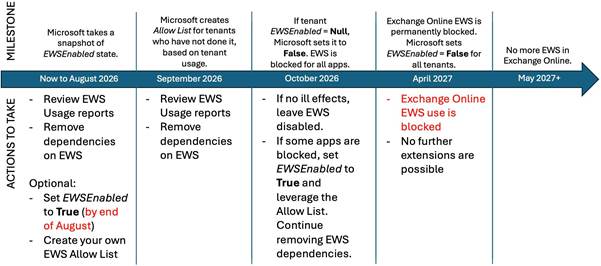
Microsoft have published a timeline for the full removal of EWS support, and have detailed one method to retain EWS API functionality until April 2027.
You must be an administrator of your Exchange Tenant to carry out the following steps.
Open Powershell and enter the following cmdlet:
Connect-ExchangeOnline
You will be prompted to sign in to your Exchange tenant.
You can see the status of your Tenant’s EWSEnabled flag with the following cmdlet
Get-OrganizationConfig | fl EWSEnabled
You will see one of the following three results:
| RESULT | MEANING |
| EWSEnabled : | Null |
| EWSEnabled : True | True |
| EWSEnabled : False | False |
The EWSEnabled property in your tenant will change on (or soon after) Oct 1, 2026, as follows:
EWSEnabled value | Before Oct 2026 | Starting Oct 2026 |
True |
| Only Apps in the AppID Allow List allowed. If the list exists, but has no entries, no EWS will be allowed. In both cases, cross-tenant organization relationship EWS traffic is allowed (reference here) |
False | All EWS Blocked | All EWS Blocked |
Null | All EWS Allowed | Changes from Null to False starting October 2026. If then changed back to Null, all EWS Allowed (AppID Allow List is ignored) |
Any tenant with EWSEnabled still set to Null on October 1, 2026, will see the value changed to False as the deployment rolls out. That will block EWS for all applications in the tenant at that time.
If you want to keep EWS blocked, you can simply leave it that way. But if you still need to use EWS, you will have two choices:
- Set EWSEnabled to True and maintain an AppID Allow List (via Baseline Security Mode or Exchange Online PowerShell).
- Set EWSEnabled back to Null, which re-enables EWS without restrictions until the final deprecation occurs. This will have to be done using Exchange Online through PowerShell.
- You can set the value using one of the following cmdlets:
- Set-OrganizationConfig -EWSEnabled $true
- Set-OrganizationConfig -EWSEnabled $null
- Set-OrganizationConfig -EWSEnabled $false
Please be aware that the above is the final temporary extension to this deadline and you should be preparing to upgrade to Spindle Document Distribution v10.16 and later.
In early 2026 Microsoft published the timeline below:
References:
Was this article helpful?
That’s Great!
Thank you for your feedback
Sorry! We couldn't be helpful
Thank you for your feedback
Feedback sent
We appreciate your effort and will try to fix the article