Introduction
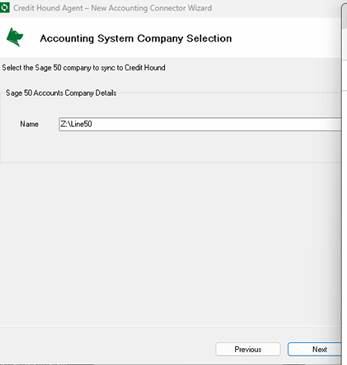
During the setup of the Credit Hound Agent, one of the steps requires you to select the Sage company to sync to Credit Hound.
As seen in the Setup guide found here: Connecting to Sage 50 Accounts UK
If you are trying to use a Mapped drive for the Company Details it will not show the Sage 50 Company.
Cause
As shown in the example below, you can see we are trying to use the “Z:\” drive for the Sage 50 company details but it is not picking this up, the reason for this is due to the Agent not supporting mapped drives.
Resolution
To get around this you will want to use the UNC path instead, so for this example that would be \\draydb02\F\Sage Data Files\Line50 when using the UNC this will work as intended. You will notice once configured the Agent will recognise the correct company and sync with Credit Hound.
Was this article helpful?
That’s Great!
Thank you for your feedback
Sorry! We couldn't be helpful
Thank you for your feedback
Feedback sent
We appreciate your effort and will try to fix the article