Introduction
Configure SPIR to pick up the Gross amount oppose to the Net amount in order to post a Purchase Invoice
Reason
As a supplier there is a requirement to provide a V.A.T breakdown to the client who the services have been provided to. However as a recipient of the services who is not V.A.T registered there is no requirement for the breakdown, therefore all that is required to take into account is the Gross amount.
Gross = Net + VAT
If a company is not VAT registered there requirement for posting is ensuring the nominal equals the gross amount. If this criteria is met then post the document.
Applies to:
SDM V7 & V8 (SPIR Module)
Resolution
In order to alter the logic on how the Goods value is being picked up there can be a change made to the Post configuration file
1. Navigate to the following location on the Server
C:\ProgramData\Draycir\Recognition\Post Agent\Client
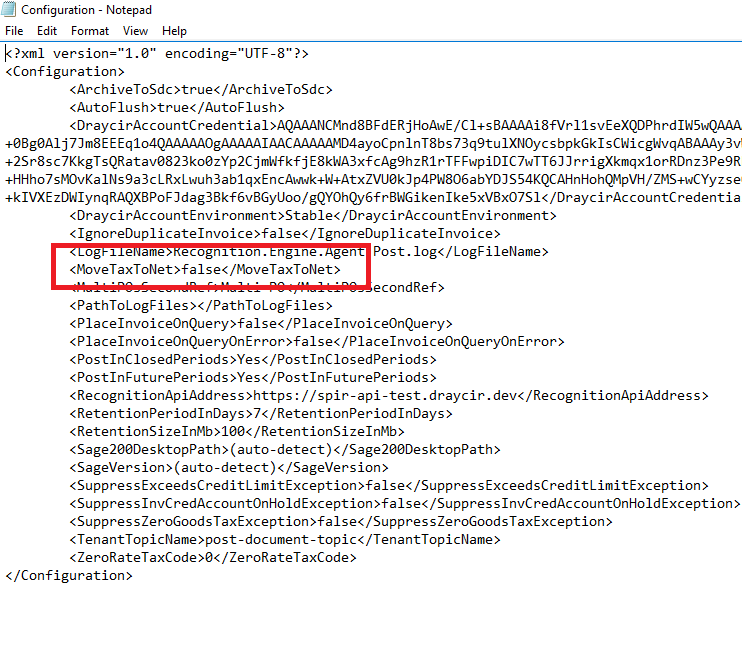
2. Change the following option from:
<MoveTaxToNet>false</MoveTaxToNet> to <MoveTaxToNet>True</MoveTaxToNet>
3. Save the changes to the file
4. Open up services.msc on the server
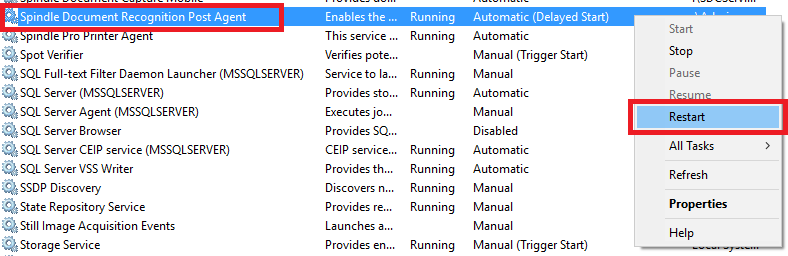
6. Locate the "Spindle Document Recognition Post Agent" service and proceed to re-start the services in order to changes to take effect.
7. Any documents which have been sent for Recognition and are is a Analysed/Verfication required state will have to be re-submitted in order for the Gross to be recognised oppose to the Net.
If there are any further requirements required please call in Draycir Support.
Knowledge Base Article Details
| Related Product | Spindle Purchase Invoice Recognition |
| Ref Number | KBA-11-03-008 |
| Document Date | 12/02/2020 |
| Original Author | Vijay Mistry |
| Document Version | v1.1 |
| Last updated | |
| Update Author |
Was this article helpful?
That’s Great!
Thank you for your feedback
Sorry! We couldn't be helpful
Thank you for your feedback
Feedback sent
We appreciate your effort and will try to fix the article