1. Automatically update Spindle Document Recognition, In theory you will always want this on so you get auto updates for the software. However, in some cases one or two customers may have customer configuration as to where if this auto updates is on those settings will get overwritten and will need to go back to devs.
2. Working hours, as per the comment - the working hours is important as it will only update the software outside these set working hours. As well, it is important when setting up a task scheduler that you do not clash with these working hours so if they are setup as "08:00 - 10:30" like shown below do to have a task schedule start at '08:00' else there may be some clashing going on.
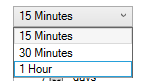
3. Data Synchronisation Intervals - This allows the site to set how frequently they want their data to be synced to our cloud servers, current intervals are (15 mins, 30 mins, 1 hour):
4 & 5. Retaining the cloud sync & post agent logs - this allows the site to customise how long they would like to keep the log files on their server before they get removed. Generally most sites will keep the cloud sync logs at 7 days as these fill up more frequently than the post agent logs, and they will set the post agent logs from 7 days to 30 days for example.
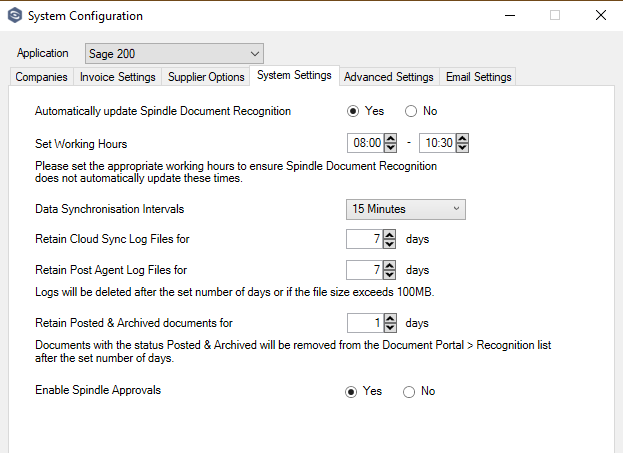
6. Retain Posted & Archived documents for - This one refers to how long documents will remain in the Document Portal once they have the 'Posted & Archived' status, once the time set in here is up the document will be hidden from the users view and will reduce lag/slowness in the portal.
Note: A trick that you can do in the document portal is, if you change this from 10 days to 30 days, invoices from 30 days ago will now be visible again until reverted back, you may need to restart the App Pools in order for this to update. But this is useful for cases where the User raises a ticket regarding invoices from a time period beyond setup here, as it allows you to take a copy of the Document Portal Report containing all this information.
7. This is where you enable the Approvals Module, If this is disabled Invoices will no longer be sent to Approvals.
Was this article helpful?
That’s Great!
Thank you for your feedback
Sorry! We couldn't be helpful
Thank you for your feedback
Feedback sent
We appreciate your effort and will try to fix the article